What a game of Hangman can teach us about Node.js — PART II
In the first article we discussed one of the ways Node handles information. I purposely kept the first article short because I wanted the…
In the first article we discussed one of the ways Node handles information. I purposely kept the first article short because I wanted the reader to really grasp how the readline and process modules work. You will soon see why it’s important to understand how these particular modules work, but before we do let’s recap.const readline = require('readline');const rl = readline.createInterface({ // Turns on readline module input: process.stdin, // Receives input
output: process.stdout // Sends output
});
NODE’S EVENT SYSTEM
Although the process module allows access to running processes we still need a method to ‘listen’ for input.
Node.js has a built-in Event System that will allow us to emit and listen for events that occur. Within this system a standard module called events exists. This includes an EventEmitter object that allows us to manipulate events that occur.
The EventEmitter object is a very important class in Node. It provides a channel for events to be dispatched and listeners to be notified. There are many objects in Node that inherit from the EventEmitter, streams being one of them.
Once we have an instance of an object that can emit events, we can add a listener for that event. Listeners are added to an EventEmitter object using one of the following functions:.addListener(eventName, callback).on(eventName, callback)// Same as '.addListener'.once(eventName, callback)
We use the second option in our code:rl.on("line", (input) => {
...
}
Let us break down what is happening above. Earlier we defined a variable (rl) to accept some input (Figure 1).const rl = readline.createInterface({ input: process.stdin,
output: process.stdout
});
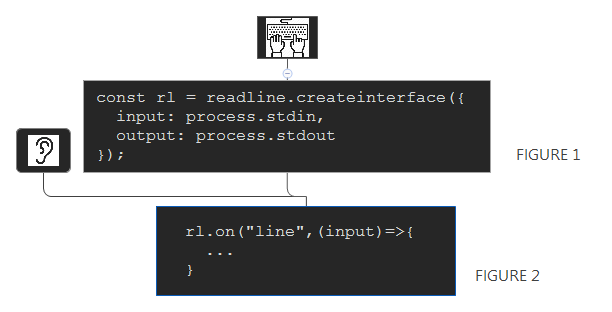
We attach a listener to our variable rl (rl.on) (Figure 2). What exactly is it listening for? It is listening for our event named ‘line’. So every-time a line event happens (like the user guessing a letter), a callback named ‘input’ is put in the event queue to be run.
Hopefully this is pretty straight forward so we can move along to the meat-and-potatoes of the function.